Playing and viewing
The project's engine is a from-scratch rewrite of the game that reads your own disc: point legaia-engine at the image and it boots Rim Elm, plays the music, runs the NPC scripts, rolls encounters and fights battles. asset-viewer is its museum-mode sibling for browsing one texture, mesh or sound bank at a time. Both ship in the release archive; commands use the bare ./tool form (source builds live at target/release/).
At a glance
- Start the gameNo arguments: the launcher remembers your disc, sets the display options, and Play opens the title screen.
- Jump somewhere
play-window --scene,--battle,--party, cheats. - Watch the movies
play-strplays an FMV with its XA audio in sync. - MinigamesFishing, dance, slots, Baka Fighter, Muscle Dome - one key from any scene.
- Record + replayDeterministic session files that need no disc to play back.
- Browse + read
asset-viewer,asset field-disasm, the browser build.
Where the data comes from
Every subcommand accepts the disc directly via --disc - no extraction step required to play. Without --disc, tools read an extracted/ tree (--extracted-root, default extracted, resolved against the current directory) produced by legaia-extract (getting started).
0 · The launcher
New to the release archive? Desktop apps covers the download, the first start past SmartScreen or Gatekeeper, the controls and the toggles, with screenshots; this page is the full reference.
Started with no subcommand - a double-click, a desktop shortcut, the macOS app - legaia-engine opens its launcher instead of printing help:
./legaia-engine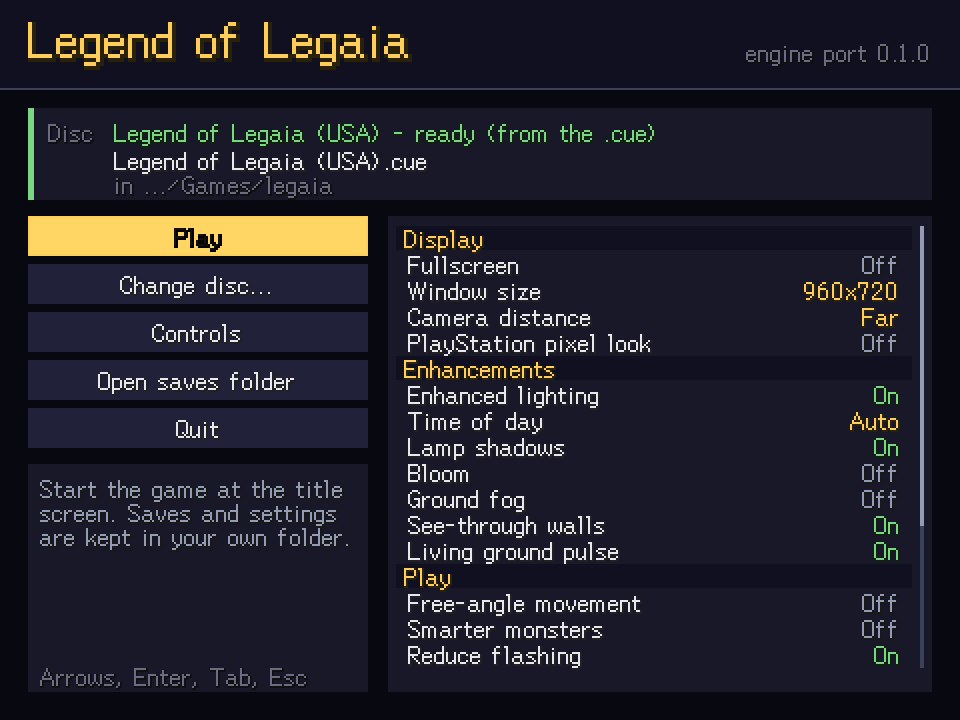
- Pick the discChoose disc... (Ctrl+O) opens the file dialog; dragging the
.bin/.cueonto the window, or typing its path, works too. - It is checkedRaw Mode 2/2352,
SYSTEM.CNFbootsSCUS_942.54,PROT.DATpresent. A wrong disc is named, with the fix. - It is rememberedSaved to
launcher.toml; next time it is ready with Play focused. Change disc... switches. - PlayThe game opens as
play-window --disc <bin> --boot-ui; the launcher closes, and comes back with the error if the game fails.
The check reads a few sectors through the same reader the game boots from; it is not the SHA-256 fingerprint disc-extract verify computes. A PAL or Japanese disc is refused with the executable it boots. A randomized or translated USA disc is accepted, since it still boots the USA executable.
Arrow keys move between every control, Tab jumps between the buttons and the options, Left / Right change an option, Enter presses, Esc quits; the mouse hovers and clicks (right-click steps an option back). The help box under the buttons explains whatever is focused.
Options
The list is grouped and scrolls when it is longer than the panel: the selected row stays in view, a bar on the right edge shows where you are, and the mouse wheel, Page Up / Page Down and Home / End move through it.
| Group | Row | Stored in | In game | Default |
|---|---|---|---|---|
| Display | Fullscreen (borderless) | legaia-options.toml | F11, Alt+Enter | off |
| Display | Window size (640x480 .. 1920x1440) | legaia-options.toml | - | 960x720 |
| Display | Camera distance (retail, far, farther) | legaia-options.toml | T | far |
| Display | PlayStation pixel look (--psx-render) | launcher.toml | - | off |
| Enhancements | Enhanced lighting | legaia-options.toml | I | on |
| Enhancements | Time of day (auto, day, dusk, night) | legaia-options.toml | F8 | auto |
| Enhancements | Lamp shadows | legaia-options.toml | Y | on |
| Enhancements | Bloom | legaia-options.toml | F10 | off |
| Enhancements | Ground fog | legaia-options.toml | F9 | off |
| Enhancements | See-through walls | legaia-options.toml | F4 | on |
| Enhancements | Living ground pulse (off = --no-entry-pulse) | launcher.toml | - | on |
| Play | Free-angle movement | legaia-options.toml | R | off |
| Play | Smarter monsters (--smart-monsters) | launcher.toml | - | off |
| Play | Reduce flashing | legaia-options.toml | - | on |
| Gameplay tweaks | Shiny Seru (off = --no-shiny-seru) | launcher.toml | - | on |
| Gameplay tweaks | Run-away EXP (--flee-exp) | launcher.toml | - | off |
| Gameplay tweaks | Fortress battles fix (off = --no-fortress-encounter-fix) | launcher.toml | - | on |
| Gameplay tweaks | Boss casts respect jewels (--jewel-fix) | launcher.toml | - | off |
| Gameplay tweaks | Battle freeze guard (off = --no-hp-readout-guard) | launcher.toml | - | on |
| Gameplay tweaks | Bonus equipment drops (--equipment-drops) | launcher.toml | - | off |
| Battle tuning | EXP rate (--exp-rate: 1x, 1.5x, 2x, 3x, 5x, 0.5x) | launcher.toml | - | 1x |
| Battle tuning | Enemy strength (--enemy-stat-scale: 1x to 5x, 0.75x, 0.5x) | launcher.toml | - | 1x |
| Battle tuning | Enemy attack count (--enemy-attack-count: 1x to 3x, 0.5x) | launcher.toml | - | 1x |
| Battle tuning | Spirit AP (--spirit-ap: 32 is the original, negative drains) | launcher.toml | - | 32 |
| Battle tuning | AP from damage (--damage-ap: 100 is the original, negative drains) | launcher.toml | - | 100 |
| Battle tuning | Seru catch rate (--seru-catch-rate: Original or 10..100%) | launcher.toml | - | Original |
| Sound | Music / sound effects volume (0..10, 8 = the original mix) | legaia-options.toml | - | 8 |
| Sound | Mono output | legaia-options.toml | - | off |
| Original game | Original ground culling | legaia-options.toml | - | on |
| Original game | Original prop culling | legaia-options.toml | - | on |
| Original game | Original game only (--retail) | launcher.toml | - | off |
The legaia-options.toml rows are the game's own options: the launcher and the in-game keys change the same value. The launcher.toml rows are launch switches; the browser play page has a box for each. Original game only starts the game retail-faithful - every enhancement off for that session, your saved options untouched. Controls shows the current key bindings. The Gameplay tweaks and Battle tuning rows are disc-patcher features the engine runs itself, so they need no patched disc; the freeze guard is the engine's own fix for a battle softlock the original can reach. When the game stops with an error, the launcher shows its error lines; the whole log is legaia-engine-game.log in the saves folder (Open saves folder). LEGAIA_LAUNCHER_DIRECT=1 skips the screen and boots a remembered disc straight away.
| Platform | Settings (launcher.toml) | Game data (bindings, options, saves/) |
|---|---|---|
| Linux | ~/.config/legaia-engine | ~/.local/share/legaia-engine |
| Windows | %APPDATA%\legaia-engine | same folder |
| macOS | ~/Library/Application Support/legaia-engine | same folder |
LEGAIA_ENGINE_CONFIG_DIR and LEGAIA_ENGINE_DATA_DIR override the two directories. Every subcommand below behaves exactly as it would without the launcher; the launcher only answers the no-argument case.
Platform notes: Windows console, Linux file dialog, Wayland
Windows. Double-click Legend of Legaia.exe: it starts legaia-engine.exe with no console window. legaia-engine.exe is a console program so its subcommands behave normally in a terminal; double-clicked directly, it closes the console it was given (a brief flash) unless LEGAIA_KEEP_CONSOLE is set, and run from a command prompt it keeps printing its log there.
Linux. The file dialog goes through the desktop's file-chooser portal; where no portal runs, drag-and-drop and the typed path still work.
Wayland. The launcher window opens through XWayland, because the windowing library has no Wayland drag-and-drop; the compositor carries a drag from a Wayland file manager across. Without XWayland (DISPLAY unset), or with LEGAIA_LAUNCHER_WAYLAND=1, the window is native Wayland and only the file dialog and the typed path take a disc. The game itself always opens on the desktop's default backend.
1 · Boot the engine
./legaia-engine play-window --disc "/path/to/Legend of Legaia (USA).bin"This boots the scene town01 (Rim Elm) straight off the disc: field rendering, BGM, NPC scripts, dialog, and the full gameplay loop - walking rolls the scene's own random encounters, a battle opens the command menu, and victory returns you to the field with XP, gold and drops. --boot-ui starts at the title screen → save-select flow instead.
Keys
Arrows are the D-pad; the rest of the desktop defaults:
| Key | Pad button |
|---|---|
| Z | Cross |
| S | Circle |
| A | Triangle |
| X | Square |
| Q / W | L1 / R1 |
| 1 / 2 | L2 / R2 |
| Enter, Space | Start |
| RShift | Select |
Esc twice quits: the first press only shows Press Esc again to quit at the bottom left of the window, and a second press within three seconds closes it, so a stray press never loses unsaved progress. The browser play page ships a different default layout (X is Circle there, C / V carry Triangle / Square, and WASD doubles the arrows), so a key that works in the tab is not necessarily the same button in the window. config show prints the desktop table, including any rebinding.
Gamepads. The native window, the browser play page and the minigames page all read a gamepad, by position: bottom / right / left / top face buttons are Cross / Circle / Square / Triangle, bumpers L1 / R1, triggers L2 / R2, back / start Select / Start, and both the d-pad and the left stick drive the d-pad. The browser takes any controller it reports with the standard mapping; the native window takes any controller its platform's gamepad backend sees. Key Config (Select on the Options screen) rebinds keys only.
Camera and window toggles
Left-mouse drag orbits the camera around your character (horizontal) and tilts it (vertical), the wheel zooms, and a double-click puts the framing back to retail, centred on the party (the browser play page's Reset camera button does the same, and also leaves the F3 debug vantage) - all three are locked while a cutscene has the camera.
| Key | Toggle | Default |
|---|---|---|
| T | Cycle the camera-distance preset: retail, far (1.35x), farther (1.8x) | far, remembered |
| R | Free-angle movement | off (retail 4/8-way movement), remembered |
| I | Enhanced lighting: a time-of-day mood, real lights at the scene's lamps and glowing props, the Genesis Tree glowing. Off is the game's own baked shading. | on, remembered |
| F8 | Time of day for enhanced lighting: auto, day, dusk, night | auto, remembered |
| Y | Shadow-casting point lights (--no-dyn-shadows starts off) | on, remembered |
| F4 | Camera-occlusion fade: walls between the camera and your character dissolve to a dither (--no-occlusion-fade starts off) | on, remembered |
| F9 | Volumetric ground fog (--no-volumetric-fog holds it off) | off, remembered |
| F10 | Bloom: lamps, glowing props, lit windows and bright sky glow softly, stronger at night | off, remembered |
| F1 | Engine diagnostic text rows | off |
| F2 | Mute audio | off, remembered |
| F3 | Wide debug orbit camera instead of the field camera | off |
In the native window each press shows the toggle's new state at the bottom left for a moment (Ground fog: off); holding a key toggles once, not repeatedly. A key that only acts while you walk around (F3, T, R) says so when pressed on the title screen or in a menu. F12 (or ?) opens a panel listing every toggle key with its current state; press it again to close it.
The browser play page answers the same keys with the canvas focused. Its presentation toggles sit in one Visual enhancements panel under the canvas: each row names its key, says in a line what it does and whether it is a port enhancement or part of the PS1's own drawing, and the panel carries the Retail-faithful switch and a Reset to defaults button.
--retail starts a session with every enhancement off and the remembered engine-only options (camera distance, movement mode, the photosensitivity guard) at their retail values, writing nothing back to the options file - the one switch for a retail-faithful run. It also pins the engine's own deviations to retail: the ledge-hop landing guard, smart monsters, overworld markers and the saved-chain Arts list go off and the battle kernels run retail's. The browser play page's Retail-faithful switch applies the same pin.
Window toggles and pad bindings cannot collide: a window key is handled before the pad lookup, so one parked on a bindable key would delete that button from the keyboard. Every toggle therefore lives on an F-key or a letter outside the bindable vocabulary (the key table above plus C, V, D, E).
Development hand-triggers
A handful of keys exercise render paths without the script that normally fires them: N opens the name-entry screen for the lead character, and F5, F, G, H and J spawn a debug effect, effect model, summon, battle move effect or field effect at an actor.
Flags that turn the loop off
--no-live-loopstops random encounters from rolling, leaving field VM + locomotion only - the mode to use when you are inspecting a scene rather than playing it. A battle the engine is already in still resolves.--no-player-battleauto-attacks each party turn instead of opening the command menu.
Rim Elm is one of them, and so are most scenes with a shop in them: their encounter regions carry a zero trigger rate, exactly as on the retail disc. The window says so in the corner (no random encounters in this scene) so a quiet walk does not look like a broken engine - step onto the overworld, or --scene map03, to fight.
2 · Pick a scene, or a fight
./legaia-engine list-scenes --disc "/path/to/disc.bin"./legaia-engine play-window --disc "/path/to/disc.bin" --scene town01list-scenes prints every scene name the game's file map exposes with the PROT entry range each covers - the same names feed --scene, and a range start is where that scene's files land in extracted/PROT/.
A scene entered this way - --scene with no save, or a scene picked on the browser play page - starts with the full party: Vahn, Noa and Gala at level 1, each from their own row of the executable's starting-party template, wearing the weakest gear the disc's equipment table lets them wear in each slot. That is an engine convenience, not retail: a true New Game (the title screen's NEW GAME, or --seed-party) starts with Vahn alone.
Getting into a battle on purpose
Waiting for a step roll is fine for playing and useless for checking something on the battle screen: the retail counter takes several hundred steps to drain. --battle names the fight instead:
./legaia-engine play-window --disc "$DISC" --scene map03 --battle first./legaia-engine play-window --disc "$DISC" --scene rikuroa --battle 17first is the scene's lowest formation row that carries monsters; a number is a specific row of the scene's own MAN encounter table (rikuroa row 17 = the lone Caruban boss) - the same id space the region roll produces, so --battle 12 fights what walking into that region would have. Unregistered rows are refused with the scene's row list logged.
The fight is armed, not injected: the row goes into the encounter transition exactly as a roll does, so the intro, the BGM swap and the battle load are the ordinary ones. It also means the fight opens a beat after boot - allow ~40 ticks when pairing it with a screenshot. --battle turns the live loop on even under --no-live-loop, because the loop is what drains the transition.
./legaia-engine play-window --disc "$DISC" --scene rikuroa --battle 17 --seed-party --screenshot /tmp/battle.png --screenshot-tick 200Choosing the party
--seed-party reseeds retail's New Game roster, which is Vahn alone. Add --party and each named member missing from the roster is seeded from its own template row, with real level-1 stats and its own name:
./legaia-engine play-window --disc "$DISC" --scene rikuroa --battle 17 --seed-party --party vahn,noa,galaThe list is in battle order (vahn/noa/gala/terra, or roster indices) and caps at the three on-screen positions. A member whose record already carries stats - a loaded save - is never overwritten.
Cheats
Native window and browser play page carry the same cheats, and each leaves a state a playthrough could reach. Native flags apply once the scene is entered; F6 and F7 work any time. On the play page they sit in the collapsed Cheats panel under the canvas.
| Cheat | Native | Effect |
|---|---|---|
| Level | --cheat-level N | Raising grants the XP that reaches level N, so stat gains are each member's own retail growth. Lowering rebuilds from New Game stats plus the kept levels' growth; stat-up items are lost. |
| Restore | --cheat-restore | Refills HP / MP and revives, mid-battle included. |
| Max AP | --cheat-max-ap, F6 | Fills the Spirit gauge to 100; in battle the Spirit / Super Art command opens at once. |
| Grant Seru | --cheat-seru N | Teaches the 21 Seru and the member's own Ra-Seru (Vahn also the Sim-Seru and Evil Seru summons), every spell at level N (1-9). |
| Learn all arts | --cheat-arts | Every art in the member's list, Hyper and Miracle Arts included. |
| Max items | --cheat-max-items | Every held item and usable consumable to 99. Key items and equipment are left alone, so no story gate opens early. |
| No encounters | --no-live-loop, F7 | Random encounters off; story and boss fights still happen. |
| Walk through walls | --cheat-noclip | The field and world-map walk ignores walls, people and props; a door you walk into still opens. |
| Gold / Coins | --cheat-gold N, --cheat-coins N | Sets the purse / casino coin bank, capped at 9,999,999. |
| Item | --cheat-item ITEM[:QTY] | Adds through the bag's own add helper: stacks cap at 99, a full bag refuses. ITEM is an id or a name (healing-leaf:5). Repeatable. |
| Codes | --cheat-file PATH | GameShark lines or a Mednafen .cht, written through the engine's map of retail RAM cells; a code with no engine cell is reported as unmapped. On the page, paste them into Codes. |
./legaia-engine play-window --disc "/path/to/disc.bin" --scene vell --cheat-level 20 --cheat-gold 50000 --cheat-item "healing leaf:20"Debug affordances: --learn-spell and --set-flag
Two screens a parity sweep needs are gated on state no other flag reaches. Both flags are debug affordances, not player surfaces, and neither changes anything when absent.
--learn-spell <ID> (repeatable, decimal or 0x hex) prepends a spell id at level 1 to the lead member's learned list - the battle Magic arm parks on an unlearned id, so without it the cast band is unreachable on a fresh roster. The player Seru-magic block is 0x81..=0x8B (spell table). Pair it with --seed-party. The older LEGAIA_LEARN_SPELLS=0x81,0x9e environment variable still works and applies after.
./legaia-engine play-window --disc "$DISC" --scene rikuroa --battle 17 --seed-party --learn-spell 0x85 --learn-spell 0x88--set-flag <N> (repeatable) raises a bit in the shared system/story-flag bank - the one field-VM op 0x07 writes - before the scene is entered, and again after --seed-party resets the bank. A raised bit is indistinguishable from one a script raised. Worked example: the Muscle Dome seeds its special-battle word from flags 0x536 / 0x537 / 0x538, and 0x538 seeds course 2 plus the bit that crosses the Ra-Seru chip out of the command ring (Muscle Dome).
./legaia-engine play-window --disc "$DISC" --scene town01 --seed-party --set-flag 0x538 --key-script "60:M" --screenshot /tmp/dome-ban.png --screenshot-tick 2003 · Play the FMVs
./legaia-engine play-str MOV/MV1.STR --disc "/path/to/disc.bin"With --disc, the argument is the movie's path inside the disc image and the interleaved XA audio track plays in sync (the video clock is driven off the audio cursor). Without --disc it plays a raw extracted .STR file (video only). To dump frames as PNGs instead, use mdec (extracting assets).
4 · Start a minigame from a live scene
Every minigame is a mode suspend on the running world, not a separate program: the field scene stays loaded underneath and comes back when you leave, so you start one from wherever you happen to be standing. Each loads that minigame's overlay off the disc, so its rules, tables and scoring come from the disc rather than from hardcoded numbers.
In play-window each is one key, and the same key leaves again:
| Key | Minigame |
|---|---|
| L | Fishing (P while fishing opens the point-exchange prize list: Up / Down move, Left / Right switch venue, Enter buys one) |
| K | Noa's dance |
| U | The how-to dance (the Disco King tutorial) |
| O | Casino slot machine |
| B | Baka Fighter |
| M | Muscle Dome |
While a minigame is up, the port's own status readout and key hints (which button attacks, how to quit) sit outside the game picture, so the game's own chrome never covers them: in the window's title bar in play-window, and in the strip under the canvas on the browser play page, fullscreen included.
On the browser play page fishing starts where the game starts it: a fishing spot's own script hands over through the field VM's minigame warp, as on the console - the page has no launcher button of its own. Circle casts and locks the power meter, Cross reels, Square reels harder (the port's choice; retail casts on Cross or Square). Points bank into the world's persistent pool, so they survive leaving and re-entering, and the prize-exchange rows come off the same overlay with retail availability gating.
The fishing HUD is the venue's own: its plates, digits, gauges and banners are records of the overlay's sprite table drawn out of the venue's HUD texture page, and the lure and count captions are read off your disc.
5 · What you hear
Both hosts decode their audio from the disc you supply - no samples ship with the engine or the site. Music is a SEQ played through the from-scratch SPU against the scene's own sound bank; sound effects come from the executable's descriptor table plus the resident program bank, keyed into the same SPU the music uses, so a cue shares the voice pool exactly as it does on hardware.
Before judging a sound, know its provenance: a cue is either disc (the id is retail's, fired where retail fires it) or site (retail's id there is unpinned, so the port reuses the closest one), and the browser page reports the split per event. The footstep is the clearest example - its timing is the retail cadence (a faster walk steps more often, standing still is silent), while the cue id it fires is the port's pick.
6 · Saves and config
Run from a terminal, the engine resolves its files against the current directory: key bindings in legaia-input.toml, options (camera preset, movement mode, the bgm_volume / sfx_volume music and sound-effect levels, 0..=10 with 8 the retail mix, and downmix_mono, the full mono downmix for a single speaker - separate from the in-game Monaural setting, which is the original’s own mono mode) in legaia-options.toml, and save slots under saves/. Run from the same directory each time - or pass explicit paths where supported (--save-dir, config set --config-file). A launcher start always runs from the per-user data directory instead, so the files stay in one place however the binary was started.
Rebind keys with config:
./legaia-engine config show./legaia-engine config set --binding Space=Cross./legaia-engine config set --binding Enter=StartKEY=BUTTON uses friendly key names (Z, Up, Enter, RShift) and PSX pad button names (Cross, Circle, Start, L1).
7 · Record and replay a session
./legaia-engine record --disc "/path/to/disc.bin" --out session.toml./legaia-engine replay --input session.tomlrecord is play-window plus input capture into a small j-replay-v1 TOML file. The file is checkpointed to disk about once a second and finalized on window close (Esc twice, or the window's close button), so an interrupted session still yields a valid file up to the last checkpoint. replay runs it back headless and deterministic - the same file always produces a bit-identical engine trace, and it needs no disc at all.
legaia-engine --help lists many more subcommands; its COMMAND GROUPS footer separates the player-facing ones above from the development diagnostics (parity oracles, synthetic state drivers) you can ignore.
8 · Browse assets interactively
asset-viewer reads the extracted/ tree (there is no --disc here - run legaia-extract first). The field and dialog demos additionally need the dialog font at extracted/font/, which the pipeline writes by default (or font-extract --disc rebuilds).
| Command | Shows |
|---|---|
./asset-viewer | The archive browser |
./asset-viewer tim extracted/tim_scan/<entry>/<tim-file> | One texture |
./asset-viewer tmd extracted/tmd_scan | Every mesh in a directory, one at a time |
./asset-viewer vab extracted/PROT/<entry>.BIN --sample 0 | One sample from a sound bank |
./asset-viewer field town01 | The playable field demo |
Started with no view named (a double-click), asset-viewer opens the archive browser on the extracted/PROT.DAT in the current folder or beside the program; with none there it says how to make one and points at legaia-studio. The browser takes entry names from the CDNAME.TXT beside PROT.DAT unless --cdname names another.
The scene name is a positional argument here, not a --scene flag (field, world and dialog all take their subject that way).
In the PROT browser: N / P = next/prev entry, PgDn / PgUp = jump 10, Esc = quit; each entry's format is auto-detected and the first viewable sub-asset is shown. tmd pointed at a directory walks every mesh with the same keys. The tim subcommand also takes extracted/PROT.DAT itself with --offset/--clut for the system-UI textures that live outside any TOC entry.
9 · Read the game's scripts
Every scene - who says what, which door leads where, what a chest holds - is driven by the field/event VM's bytecode. Its disassembler is a subcommand of the release asset binary:
./asset field-disasm scan-prot --prot extracted/PROT.DAT./asset field-disasm file <extracted-script-body>scan-prot sweeps the archive for event scripts and FMV triggers; file walks one raw script linearly. For a specific scene's per-scene scripts (LZS-compressed inside the scene's MAN sub-asset), the engine has the direct path:
./legaia-engine man-scripts --scene town01 --disc "/path/to/disc.bin"10 · Run the browser version locally
The same engine runs in a browser as the static site's play page, sharing the simulation kernels with the native window. That build is not in the clone - site/wasm/ is generated output. Build it once (around nine minutes cold; needs wasm-pack), serve the site, and open /play.html:
scripts/ci/build-wasm.shpython3 -m http.server -d siteNothing is uploaded: the disc image you pick stays in the tab.
Rebuild after changing anything the page compiles - which is most of the workspace, not just the four crates/web-* crates (web-viewer over web-play, web-minigames and web-patcher). To check whether the bundle you built still matches your sources:
python3 scripts/ci/check-wasm-freshness.pyWorth running before concluding a change did or didn't work in the browser: a stale bundle looks exactly like a fix that had no effect. Background: tooling/shipped-bundle-freshness.md.